WebView2 和 Electron

在过去的几周里,我们收到了一些关于新的 WebView2 和 Electron 之间差异的问题。
🌐 Over the past weeks, we’ve received several questions about the differences between the new WebView2 and Electron.
双方团队都明确表示,目标是在桌面端将网络技术发挥到最佳,并且正在讨论一份全面的共享对比。
🌐 Both teams have the expressed goal of making web-tech the best it can be on the Desktop, and a shared comprehensive comparison is being discussed.
Electron 和 WebView2 是发展迅速且不断演变的项目。我们整理了 Electron 和 WebView2 当今存在的相似点和不同点的简要概览。
🌐 Electron and WebView2 are fast-moving and constantly evolving projects. We have assembled a brief snapshot of similarities and differences between Electron and WebView2 as they exist today.
架构概述
🌐 Architecture Overview
Electron 和 WebView2 都是基于 Chromium 源码来渲染网页内容的。 严格来说,WebView2 基于 Edge 源码构建,但 Edge 是使用 Chromium 源码的一个分支构建的。 Electron 不与 Chrome 共享任何 DLL。 WebView2 二进制文件与 Edge(截至 Edge 90 的稳定通道)硬链接,因此它们共享磁盘和部分工作集。 更多信息请参见 Evergreen 分发模式。
🌐 Electron and WebView2 both build from the Chromium source for rendering web content. Strictly speaking, WebView2 builds from the Edge source, but Edge is built using a fork of the Chromium source. Electron does not share any DLLs with Chrome. WebView2 binaries hard link against Edge (Stable channel as of Edge 90), so they share disk and some working set. See Evergreen distribution mode for more info.
Electron 应用总是会打包并分发其开发时使用的 Electron 的确切版本。 WebView2 在分发方面有两种选择。 你可以打包应用开发时使用的确切 WebView2 库,或者使用可能已经存在于系统中的共享运行时版本。 WebView2 为每种方式提供了工具,包括在缺少共享运行时时的引导安装程序。 从 Windows 11 开始,WebView2 已经作为 内置 提供。
🌐 Electron apps always bundle and distribute the exact version of Electron with which they were developed. WebView2 has two options in distribution. You can bundle the exact WebView2 library your application was developed with, or you can use a shared-runtime version that may already be present on the system. WebView2 provides tools for each approach, including a bootstrapping installer in case the shared runtime is missing. WebView2 is shipped inbox starting with Windows 11.
打包其框架的应用有责任更新这些框架,包括小型安全更新。对于使用共享 WebView2 运行时的应用,WebView2 有自己的更新程序,类似于 Chrome 或 Edge,运行独立于你的应用。更新应用的代码或任何其他依赖仍然是开发者的责任,与 Electron 相同。Electron 和 WebView2 都不受 Windows 更新管理。
🌐 Applications that bundle their frameworks are responsible for updating those frameworks, including minor security releases. For apps using the shared WebView2 runtime, WebView2 has its own updater, similar to Chrome or Edge, that runs independent of your application. Updating the application's code or any of its other dependencies is still a responsibility for the developer, same as with Electron. Neither Electron nor WebView2 is managed by Windows Update.
Electron 和 WebView2 都继承了 Chromium 的多进程架构——即一个主进程与一个或多个渲染进程进行通信。 这些进程与系统上运行的其他应用完全独立。 每个 Electron 应用都是一个独立的进程树,包含一个根浏览器进程、一部分辅助进程,以及零个或多个渲染进程。 使用相同 用户数据文件夹 的 WebView2 应用(例如一组应用)会共享非渲染进程。 使用不同数据文件夹的 WebView2 应用则不会共享进程。
🌐 Both Electron and WebView2 inherit Chromium’s multi-process architecture - namely, a single main process that communicates with one-or-more renderer processes. These processes are entirely separate from other applications running on the system. Every Electron application is a separate process tree, containing a root browser-process, some utility processes, and zero or more render processes. WebView2 apps that use the same user data folder (like a suite of apps would do), share non-renderer processes. WebView2 apps using different data folders do not share processes.
-
ElectronJS 进程模型:
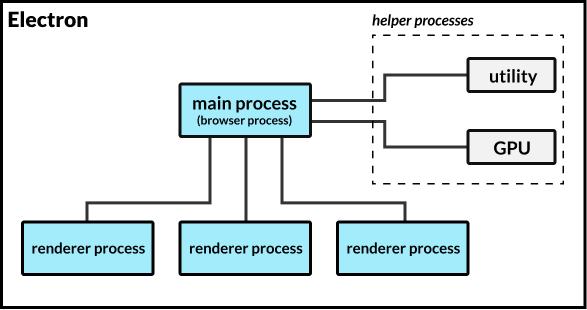
-
基于 WebView2 的应用进程模型:
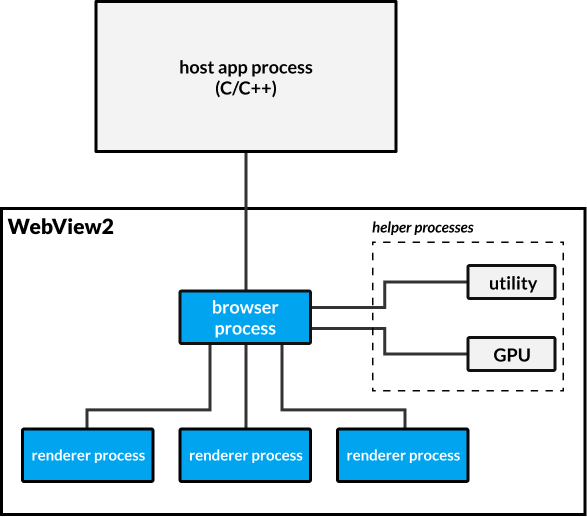
在此了解更多关于 WebView2 的进程模型 和 Electron 的进程模型 的信息。
🌐 Read more about WebView2’s process model and Electron’s process model here.
Electron 提供用于常见桌面应用需求的 API,例如菜单、文件系统访问、通知等。 WebView2 是一个组件,旨在集成到像 WinForms、WPF、WinUI 或 Win32 这样的应用框架中。 WebView2 不通过 JavaScript 提供操作系统 API,仅限于网页标准。
🌐 Electron provides APIs for common desktop application needs such as menus, file system access, notifications, and more. WebView2 is a component meant to be integrated into an application framework such as WinForms, WPF, WinUI, or Win32. WebView2 does not provide operating system APIs outside the web standard via JavaScript.
Node.js 已集成到 Electron 中。 Electron 应用可以在渲染器和主进程中使用任何 Node.js API、模块或本地 Node 插件。 WebView2 应用不会假定应用的其他部分是使用哪种语言或框架编写的。 你的 JavaScript 代码必须通过应用主机进程代理任何操作系统访问。
🌐 Node.js is integrated into Electron. Electron applications may use any Node.js API, module, or node-native-addon from the renderer and main processes. A WebView2 application does not assume which language or framework the rest of your application is written in. Your JavaScript code must proxy any operating system access through the application-host process.
Electron 力求保持与 Web API 的兼容性,包括由 Fugu 项目 开发的 API。我们有一个 Electron 的 Fugu API 兼容性快照。WebView2 保持了一个类似的 Edge API 差异列表。
🌐 Electron strives to maintain compatibility with the web API, including APIs developed from the Fugu Project. We have a snapshot of Electron’s Fugu API compatibility. WebView2 maintains a similar list of API differences from Edge.
Electron 对网页内容有可配置的安全模型,从完全访问到完全沙箱隔离。 WebView2 内容始终在沙箱中运行。 Electron 有关于选择安全模型的全面安全文档。 WebView2 也有安全最佳实践。
🌐 Electron has a configurable security model for web content, from full-access to full-sandbox. WebView2 content is always sandboxed. Electron has comprehensive security documentation on choosing your security model. WebView2 also has security best practices.
Electron 的源代码在 GitHub 上维护并可获取。应用可以修改并构建自己的 Electron 品牌。WebView2 的源代码在 GitHub 上不可获取。
🌐 The Electron source is maintained and available on GitHub. Applications can modify can build their own brands of Electron. The WebView2 source is not available on GitHub.
快速摘要:
🌐 Quick Summary:
| Electron | WebView2 | |
|---|---|---|
| 构建依赖 | Chromium | Edge |
| GitHub 上是否有源码 | 是 | 否 |
| 是否共享 Edge/Chrome DLL | 否 | 是(从 Edge 90 起) |
| 应用之间共享运行时 | 否 | 可选 |
| 应用 API | 有 | 无 |
| Node.js | 有 | 无 |
| 沙箱 | 可选 | 始终开启 |
| 是否需要应用框架 | 否 | 是 |
| 支持的平台 | Mac、Win、Linux | Win(计划支持 Mac/Linux) |
| 应用之间进程共享 | 从不 | 可选 |
| 框架更新管理 | 由应用管理 | WebView2 管理 |
性能讨论
🌐 Performance Discussion
在渲染你的网页内容时,我们预期 Electron、WebView2 以及任何其他基于 Chromium 的渲染器之间的性能差异很小。我们为有兴趣研究潜在性能差异的人创建了 使用 Electron、C++ + WebView2 和 C# + WebView2 构建的应用脚手架。
🌐 When it comes to rendering your web content, we expect little performance difference between Electron, WebView2, and any other Chromium-based renderer. We created scaffolding for apps built using Electron, C++ + WebView2, and C# + WebView2 for those interested to investigate potential performance differences.
在渲染网页内容之外,还有一些差异会发挥作用,来自 Electron、WebView2、Edge 等的人员都表示有兴趣共同进行包括 PWA 在内的详细比较。
🌐 There are a few differences that come into play outside of rendering web content, and folks from Electron, WebView2, Edge, and others have expressed interest in working on a detailed comparison including PWAs.
进程间通信 (IPC)
🌐 Inter-Process Communication (IPC)
我们想立即强调一个差异,因为我们认为它在 Electron 应用中往往涉及性能考量。
🌐 There is one difference we want to highlight immediately, as we believe it is often a performance consideration in Electron apps.
在 Chromium 中,浏览器进程充当受沙箱保护的渲染器与系统其他部分之间的 IPC 代理。虽然 Electron 允许不受沙箱保护的渲染进程,但许多应用选择启用沙箱以增强安全性。WebView2 始终启用沙箱,因此对于大多数 Electron 和 WebView2 应用,IPC 可能会影响整体性能。
🌐 In Chromium, the browser process acts as an IPC broker between sandboxed renderers and the rest of the system. While Electron allows unsandboxed render processes, many apps choose to enable the sandbox for added security. WebView2 always has the sandbox enabled, so for most Electron and WebView2 apps IPC can impact overall performance.
尽管 Electron 和 WebView2 有类似的进程模型,但底层的 IPC 是不同的。在 JavaScript 与 C++ 或 C# 之间进行通信需要进行 封送处理,最常见的是转为 JSON 字符串。JSON 序列化/解析是一个开销较大的操作,而 IPC 瓶颈可能会对性能产生负面影响。从 Edge 93 开始,WV2 将在网络事件中使用 CBOR 。
Electron 支持通过 MessagePorts API 在任意两个进程之间进行直接 IPC,使用了 结构化克隆算法。利用这一点的应用在进程间发送对象时可以避免 JSON 序列化的开销。
🌐 Electron supports direct IPC between any two processes via the MessagePorts API, which utilize the structured clone algorithm. Applications which leverage this can avoid paying the JSON-serialization tax when sending objects between processes.
概括
🌐 Summary
Electron 和 WebView2 有很多不同之处,但在渲染网页内容的性能上不要期望有太大差异。归根结底,应用的架构和 JavaScript 库/框架对内存和性能的影响要比其他任何东西都大,因为无论运行在哪里,Chromium 就是 Chromium。
🌐 Electron and WebView2 have a number of differences, but don't expect much difference with respect to how they perform rendering web content. Ultimately, an app’s architecture and JavaScript libraries/frameworks have a larger impact on memory and performance than anything else because Chromium is Chromium regardless of where it is running.
特别感谢 WebView2 团队审阅本文,并确保我们对 WebView2 架构有最新的了解。他们欢迎对该项目的任何反馈。
🌐 Special thanks to the WebView2 team for reviewing this post, and ensuring we have an up-to-date view of the WebView2 architecture. They welcome any feedback on the project.