Electron 15.0.0

· 7 min read

Electron 15.0.0 已经发布!它包括对 Chromium 94、V8 9.4 和 Node.js 16.5.0 的升级。我们还在 window.open 上添加了 API 更新,修复了 bug,并进行了整体改进。详情请阅读下文!

🌐 Electron 15.0.0 has been released! It includes upgrades to Chromium 94, V8 9.4, and Node.js 16.5.0. We've added API updates to window.open, bug fixes, and general improvements. Read below for more details!


Electron 团队很高兴宣布发布 Electron 15.0.0!你可以通过 npm 使用 npm install electron@latest 安装,或者从我们的 发布网站 下载。继续阅读以了解此版本的详细信息,并请分享你的任何反馈意见!

🌐 The Electron team is excited to announce the release of Electron 15.0.0! You can install it with npm via npm install electron@latest or download it from our releases website. Continue reading for details about this release and please share any feedback you have!

Electron 发布节奏变更

🌐 Electron Release Cadence Change

从 Electron 15 开始,Electron 将每 8 周发布一个新的主要稳定版本。你可以在这里阅读完整详情。

🌐 Starting with Electron 15, Electron will release a new major stable version every 8 weeks. You can read the full details here.

此外,Electron 将把支持的版本从最新的三个版本更改为最新的四个版本,直到 2022 年 5 月。查看我们的版本文档以获取有关 Electron 版本控制的更多详细信息。

🌐 Additionally, Electron will be changing supported versions from latest three versions to latest four versions until May 2022. See our versioning documentfor more detailed information about versioning in Electron.

显著变化

🌐 Notable Changes

  • nativeWindowOpen: true 不再是实验性的,现在已成为默认设置。
  • 添加了 safeStorage 字符串加密 API。#30430
  • WebContents 中添加了 'frame-created' 事件,该事件在页面中创建框架时触发。 #30801
  • 已将调整大小的 edge 信息添加到 BrowserWindowwill-resize 事件中。 #29199

请查看 15.0.0 版本说明 以获取新功能和更改的完整列表。

🌐 See the 15.0.0 release notes for a full list of new features and changes.

Electron 14.0.0

· 12 min read

Electron 14.0.0 已经发布!它包括对 Chromium 93 和 V8 9.3 的升级。我们新增了多个 API 更新、修复了若干错误,并进行了整体改进。详情请阅读下面内容!

🌐 Electron 14.0.0 has been released! It includes upgrades to Chromium 93 and V8 9.3. We've added several API updates, bug fixes, and general improvements. Read below for more details!


Electron 团队很高兴地宣布 Electron 14.0.0 正式发布!你可以通过 npm 使用 npm install electron@latest 安装,或者从我们的发布网站下载。继续阅读了解本次发布的详细信息,并欢迎分享你的任何反馈!

🌐 The Electron team is excited to announce the release of Electron 14.0.0! You can install it with npm via npm install electron@latest or download it from our releases website. Continue reading for details about this release and please share any feedback you have!

Electron 发布节奏变更

🌐 Electron Release Cadence Change

从 2021 年 9 月的 Electron 15 开始,Electron 将每 8 周发布一个新的主要稳定版本。你可以在此处阅读完整详情

Electron 15 的测试版将于 2021 年 9 月 1 日开始,稳定版将于 2021 年 9 月 21 日发布。你可以在此处查看 Electron 的公开时间表

此外,Electron 将把受支持的版本从最近三个版本更改为最近四个版本,直到 2022 年 5 月。关于 Electron 版本的更多详细信息,请参见我们的版本管理文档

🌐 Beginning in September 2021 with Electron 15, Electron will release a new major stable version every 8 weeks. You can read the full details here. Electron 15 will begin beta on September 1, 2021 and stable release will be on September 21, 2021. You can find Electron's public timeline here. Additionally, Electron will be changing supported versions from latest three versions to latest four versions until May 2022. See see our versioning document for more detailed information about versioning in Electron.

显著变化

🌐 Notable Changes

  • 默认已更改:nativeWindowOpen 现在默认为 true(查看文档)
  • 子窗口不再继承其父窗口的 BrowserWindow 构造选项。 #28550
  • 新增 session.storagePath API,用于获取会话特定数据在磁盘上的路径。 #28665
  • 添加了 process.contextId,由 @electron/remote 使用。 #28007
  • Electron Fuse 后添加了实验性的 cookie 加密支持。 #29492

请查看 14.0.0 版本说明 以获取完整的新功能和更改列表。

🌐 See the 14.0.0 release notes for a full list of new features and changes.

WebView2 和 Electron

· 11 min read

在过去的几周里,我们收到了一些关于新的 WebView2 和 Electron 之间差异的问题。

🌐 Over the past weeks, we’ve received several questions about the differences between the new WebView2 and Electron.

双方团队都明确表示,目标是在桌面端将网络技术发挥到最佳,并且正在讨论一份全面的共享对比。

🌐 Both teams have the expressed goal of making web-tech the best it can be on the Desktop, and a shared comprehensive comparison is being discussed.

Electron 和 WebView2 是发展迅速且不断演变的项目。我们整理了 Electron 和 WebView2 当今存在的相似点和不同点的简要概览。

🌐 Electron and WebView2 are fast-moving and constantly evolving projects. We have assembled a brief snapshot of similarities and differences between Electron and WebView2 as they exist today.


架构概述

🌐 Architecture Overview

Electron 和 WebView2 都是基于 Chromium 源码来渲染网页内容的。 严格来说,WebView2 基于 Edge 源码构建,但 Edge 是使用 Chromium 源码的一个分支构建的。 Electron 不与 Chrome 共享任何 DLL。 WebView2 二进制文件与 Edge(截至 Edge 90 的稳定通道)硬链接,因此它们共享磁盘和部分工作集。 更多信息请参见 Evergreen 分发模式

🌐 Electron and WebView2 both build from the Chromium source for rendering web content. Strictly speaking, WebView2 builds from the Edge source, but Edge is built using a fork of the Chromium source. Electron does not share any DLLs with Chrome. WebView2 binaries hard link against Edge (Stable channel as of Edge 90), so they share disk and some working set. See Evergreen distribution mode for more info.

Electron 应用总是会打包并分发其开发时使用的 Electron 的确切版本。 WebView2 在分发方面有两种选择。 你可以打包应用开发时使用的确切 WebView2 库,或者使用可能已经存在于系统中的共享运行时版本。 WebView2 为每种方式提供了工具,包括在缺少共享运行时时的引导安装程序。 从 Windows 11 开始,WebView2 已经作为 内置 提供。

🌐 Electron apps always bundle and distribute the exact version of Electron with which they were developed. WebView2 has two options in distribution. You can bundle the exact WebView2 library your application was developed with, or you can use a shared-runtime version that may already be present on the system. WebView2 provides tools for each approach, including a bootstrapping installer in case the shared runtime is missing. WebView2 is shipped inbox starting with Windows 11.

打包其框架的应用有责任更新这些框架,包括小型安全更新。对于使用共享 WebView2 运行时的应用,WebView2 有自己的更新程序,类似于 Chrome 或 Edge,运行独立于你的应用。更新应用的代码或任何其他依赖仍然是开发者的责任,与 Electron 相同。Electron 和 WebView2 都不受 Windows 更新管理。

🌐 Applications that bundle their frameworks are responsible for updating those frameworks, including minor security releases. For apps using the shared WebView2 runtime, WebView2 has its own updater, similar to Chrome or Edge, that runs independent of your application. Updating the application's code or any of its other dependencies is still a responsibility for the developer, same as with Electron. Neither Electron nor WebView2 is managed by Windows Update.

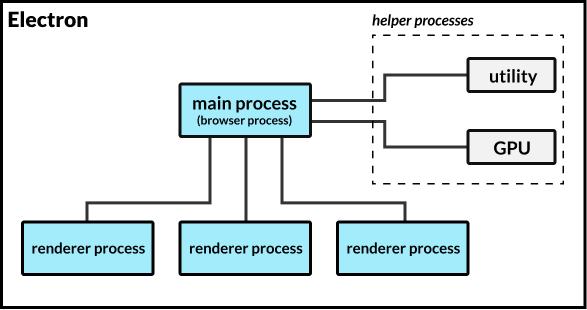
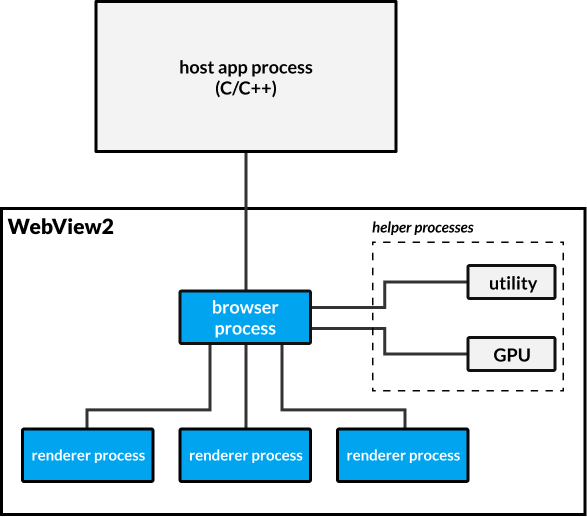
Electron 和 WebView2 都继承了 Chromium 的多进程架构——即一个主进程与一个或多个渲染进程进行通信。 这些进程与系统上运行的其他应用完全独立。 每个 Electron 应用都是一个独立的进程树,包含一个根浏览器进程、一部分辅助进程,以及零个或多个渲染进程。 使用相同 用户数据文件夹 的 WebView2 应用(例如一组应用)会共享非渲染进程。 使用不同数据文件夹的 WebView2 应用则不会共享进程。

🌐 Both Electron and WebView2 inherit Chromium’s multi-process architecture - namely, a single main process that communicates with one-or-more renderer processes. These processes are entirely separate from other applications running on the system. Every Electron application is a separate process tree, containing a root browser-process, some utility processes, and zero or more render processes. WebView2 apps that use the same user data folder (like a suite of apps would do), share non-renderer processes. WebView2 apps using different data folders do not share processes.

  • ElectronJS 进程模型:

    ElectronJS 进程模型图

  • 基于 WebView2 的应用进程模型:

    WebView2 进程模型图

在此了解更多关于 WebView2 的进程模型Electron 的进程模型 的信息。

🌐 Read more about WebView2’s process model and Electron’s process model here.

Electron 提供用于常见桌面应用需求的 API,例如菜单、文件系统访问、通知等。 WebView2 是一个组件,旨在集成到像 WinForms、WPF、WinUI 或 Win32 这样的应用框架中。 WebView2 不通过 JavaScript 提供操作系统 API,仅限于网页标准。

🌐 Electron provides APIs for common desktop application needs such as menus, file system access, notifications, and more. WebView2 is a component meant to be integrated into an application framework such as WinForms, WPF, WinUI, or Win32. WebView2 does not provide operating system APIs outside the web standard via JavaScript.

Node.js 已集成到 Electron 中。 Electron 应用可以在渲染器和主进程中使用任何 Node.js API、模块或本地 Node 插件。 WebView2 应用不会假定应用的其他部分是使用哪种语言或框架编写的。 你的 JavaScript 代码必须通过应用主机进程代理任何操作系统访问。

🌐 Node.js is integrated into Electron. Electron applications may use any Node.js API, module, or node-native-addon from the renderer and main processes. A WebView2 application does not assume which language or framework the rest of your application is written in. Your JavaScript code must proxy any operating system access through the application-host process.

Electron 力求保持与 Web API 的兼容性,包括由 Fugu 项目 开发的 API。我们有一个 Electron 的 Fugu API 兼容性快照。WebView2 保持了一个类似的 Edge API 差异列表

🌐 Electron strives to maintain compatibility with the web API, including APIs developed from the Fugu Project. We have a snapshot of Electron’s Fugu API compatibility. WebView2 maintains a similar list of API differences from Edge.

Electron 对网页内容有可配置的安全模型,从完全访问到完全沙箱隔离。 WebView2 内容始终在沙箱中运行。 Electron 有关于选择安全模型的全面安全文档。 WebView2 也有安全最佳实践

🌐 Electron has a configurable security model for web content, from full-access to full-sandbox. WebView2 content is always sandboxed. Electron has comprehensive security documentation on choosing your security model. WebView2 also has security best practices.

Electron 的源代码在 GitHub 上维护并可获取。应用可以修改并构建自己的 Electron 品牌。WebView2 的源代码在 GitHub 上不可获取。

🌐 The Electron source is maintained and available on GitHub. Applications can modify can build their own brands of Electron. The WebView2 source is not available on GitHub.

快速摘要:

🌐 Quick Summary:

ElectronWebView2
Build DependencyChromiumEdge
Source Available on GitHubYesNo
Shares Edge/Chrome DLLsNoYes (as of Edge 90)
Shared Runtime Between ApplicationsNoOptional
Application APIsYesNo
Node.jsYesNo
SandboxOptionalAlways
Requires an Application FrameworkNoYes
Supported PlatformsMac, Win, LinuxWin (Mac/Linux planned)
Process Sharing Between AppsNeverOptional
Framework Updates Managed ByApplicationWebView2

性能讨论

🌐 Performance Discussion

在呈现你的网页内容时,我们预期 Electron、WebView2 以及任何其他基于 Chromium 的渲染器之间的性能差异很小。我们为有兴趣研究潜在性能差异的人创建了 使用 Electron、C++ + WebView2 和 C# + WebView2 构建的应用脚手架

🌐 When it comes to rendering your web content, we expect little performance difference between Electron, WebView2, and any other Chromium-based renderer. We created scaffolding for apps built using Electron, C++ + WebView2, and C# + WebView2 for those interested to investigate potential performance differences.

在呈现网页内容之外,还有一些差异会发挥作用,来自 Electron、WebView2、Edge 等的人员都表示有兴趣共同进行包括 PWA 在内的详细比较。

🌐 There are a few differences that come into play outside of rendering web content, and folks from Electron, WebView2, Edge, and others have expressed interest in working on a detailed comparison including PWAs.

进程间通信 (IPC)

🌐 Inter-Process Communication (IPC)

我们想立即强调一个差异,因为我们认为它在 Electron 应用中往往涉及性能考量。

🌐 There is one difference we want to highlight immediately, as we believe it is often a performance consideration in Electron apps.

在 Chromium 中,浏览器进程充当受沙箱保护的渲染器与系统其他部分之间的 IPC 代理。虽然 Electron 允许不受沙箱保护的渲染进程,但许多应用选择启用沙箱以增强安全性。WebView2 始终启用沙箱,因此对于大多数 Electron 和 WebView2 应用,IPC 可能会影响整体性能。

🌐 In Chromium, the browser process acts as an IPC broker between sandboxed renderers and the rest of the system. While Electron allows unsandboxed render processes, many apps choose to enable the sandbox for added security. WebView2 always has the sandbox enabled, so for most Electron and WebView2 apps IPC can impact overall performance.

尽管 Electron 和 WebView2 有类似的进程模型,但底层的 IPC 是不同的。在 JavaScript 与 C++ 或 C# 之间进行通信需要进行 封送处理,最常见的是转为 JSON 字符串。JSON 序列化/解析是一个开销较大的操作,而 IPC 瓶颈可能会对性能产生负面影响。从 Edge 93 开始,WV2 将在网络事件中使用 CBOR

Electron 支持通过 MessagePorts API 在任意两个进程之间进行直接 IPC,使用了 结构化克隆算法。利用这一点的应用在进程间发送对象时可以避免 JSON 序列化的开销。

🌐 Electron supports direct IPC between any two processes via the MessagePorts API, which utilize the structured clone algorithm. Applications which leverage this can avoid paying the JSON-serialization tax when sending objects between processes.

概括

🌐 Summary

Electron 和 WebView2 有很多不同之处,但在渲染网页内容的性能上不要期望有太大差异。归根结底,应用的架构和 JavaScript 库/框架对内存和性能的影响要比其他任何东西都大,因为无论运行在哪里,Chromium 就是 Chromium

🌐 Electron and WebView2 have a number of differences, but don't expect much difference with respect to how they perform rendering web content. Ultimately, an app’s architecture and JavaScript libraries/frameworks have a larger impact on memory and performance than anything else because Chromium is Chromium regardless of where it is running.

特别感谢 WebView2 团队审阅本文,并确保我们对 WebView2 架构有最新的了解。他们欢迎对该项目的任何反馈

🌐 Special thanks to the WebView2 team for reviewing this post, and ensuring we have an up-to-date view of the WebView2 architecture. They welcome any feedback on the project.

新的 Electron 发布周期

· 10 min read

从 2021 年 9 月开始,Electron 将每 8 周发布一个新的主要稳定版本。

🌐 Beginning in September 2021, Electron will release a new major stable version every 8 weeks.


2019 年,Electron 转向了 12 周的发布周期,以配合 Chromium 的 6 周发布周期。最近,Chrome 和微软都宣布了变动,这让我们重新考虑 Electron 当前的发布节奏:

🌐 In 2019, Electron moved to a 12 week release cycle to match Chromium's 6 week release cycle. Recently, both Chrome and Microsoft announced changes that made us reconsider Electron's current release cadence:

  1. Chromium 计划4 周 发布一个新里程碑,从 2021 年 9 月 21 日的 Chrome 94 开始。 这一发布节奏还增加了每 8 周一个新的扩展稳定版选项,其中将包含所有更新的安全修复。
  2. 微软商店将要求基于 Chromium 的应用版本不得早于最近的两个主要版本。例如,如果 Chromium 最新发布的主要版本是 85,则任何基于 Chromium 的浏览器必须至少为 Chromium 版本 83 或更高。此规则包括 Electron 应用。

从2021年9月开始,Electron 将每8周发布一个新的主要稳定版本,以配合 Chromium 的8周扩展稳定版发布周期。

我们首个基于 Chromium Extended Stable 的版本将是 Electron 15,发布日期为 2021 年 9 月 21 日

🌐 Our first release with Chromium Extended Stable will be Electron 15 on September 21st, 2021.

鉴于我们知道版本发布节奏的改变会影响其他下游应用,我们希望尽快让开发者社区知晓。请继续阅读,了解我们2021年的发布计划详情。

🌐 Knowing that a release cadence change will impact other downstream applications, we wanted to let our developer community know as soon as possible. Read on for more details about our 2021 release schedule.

Electron 15:临时 Alpha

🌐 Electron 15: Temporary Alpha

鉴于我们最初的 Electron 15 版本面向的是非扩展稳定版本(Chromium 的扩展稳定版本基于其偶数版本),我们需要更改原定的目标发布日期。然而,Electron 应用必须使用 Chromium 的最新两个主要版本才能被 Microsoft Store 接受,这使得等待两个 Chromium 版本成为不可行的选择。

🌐 Given that our original Electron 15 release targeted a non-Extended Stable version (Chromium's Extended Stable versions are based on their even-numbered versions), we needed to change our original target release date. However, an Electron app must use the most recent 2 major versions of Chromium to be accepted to the Microsoft Store, which made waiting for two Chromium versions untenable.

有了这两个要求,我们的团队面临时间上的困境。将 Electron 15 升级以包含 Chromium M94 将让应用开发者能够使用 Chromium 的第一个扩展稳定版本;然而,这也会将从测试版到稳定版的周期缩短到仅 3 周。

🌐 With these two requirements, our team faced a timing dilemma. Moving Electron 15 to include Chromium M94 would allow app developers to get on the very first Extended Stable version of Chromium; however, it would also shorten the beta-to-stable cycle to only 3 weeks.

为了帮助进行这一转变,Electron 将提供一个临时的 Alpha 版本,仅针对 Electron 15 发行。这个 Alpha 版本将允许开发者有更多时间测试和规划 Electron 15 的发布,而且其稳定性比我们目前的每日构建版本更高。

🌐 To help with this switchover, Electron will offer a temporary alpha build, only for the Electron 15 release. This alpha build will allow developers more time to test and plan for an Electron 15 release, with a more stable build than our current nightlies.

Electron 15 的 alpha 通道版本将于 2021 年 7 月 20 日 发布。它将在 2021 年 9 月 1 日 转为 beta 版本,计划于 2021 年 9 月 21 日 发布稳定版本。后续的 Electron 版本将不再发布 alpha 版本。

🌐 The alpha channel build will ship for Electron 15 on July 20th, 2021. It will transition to a beta release on September 1st, 2021 with a stable release target of September 21st, 2021. Subsequent Electron releases will not have alpha releases.

2021 年发布计划

🌐 2021 Plan for Releases

以下是我们 2021 年的当前发布计划:

🌐 Below is our current release schedule for 2021:

ElectronChromeAlpha 版本Beta 版本稳定版本稳定周期(周)
E13M91-2021-03-052021-05-2512
E14M93-2021-05-262021-08-3114
E15M942021-07-202021-09-012021-09-219(含 alpha)
E16M96-2021-09-222021-11-168
E17M98-2021-11-172022-02-0111

添加 alpha 通道将 Electron 15 发布前的开发时间从 3 周延长到 9 周——更接近我们新的 8 周周期,同时仍满足 Windows Store 提交的要求。

🌐 Adding the alpha channel extends the development time before Electron 15's launch from 3 weeks to 9 weeks - closer to our new 8 week cycle, while still meeting the requirements for Windows Store submission.

为了进一步帮助应用开发者,从2021年剩余时间直到2022年5月,我们也将把支持的 Electron 版本政策从最新的3个版本扩展到最新的4个版本。 这意味着即使你无法立即调整升级计划,旧版本的 Electron 仍然会收到安全更新和修复。

🌐 To further help app developers, for the remainder of 2021 until May 2022, we will also be extending our supported versions policy from the latest 3 versions to the latest 4 versions of Electron. That means that even if you can't immediately alter your upgrade schedule, older versions of Electron will still receive security updates and fixes.

寻址关注点

🌐 Addressing Concerns

我们之所以在这一发布周期变更计划之前提前发布这篇文章是有原因的。我们知道,更快的发布周期将对 Electron 应用产生实际影响——其中一些应用可能已经觉得我们的重大版本发布节奏很紧凑。

🌐 There's a reason we're publishing this post well before this release cycle change is scheduled. We know that a faster release cycle will have a real impact on Electron apps - some of which may already find our major release cadence aggressive.

我们已尝试解决以下常见问题:

🌐 We've tried to address common concerns below:

❓ 为什么要做这个改变?为什么不保持12周的发布节奏?

🌐 ❓ Why even make this change? Why not keep the 12 week release cadence?

为了在 Electron 中提供最新版本的 Chromium,我们的计划需要与他们的保持同步。关于 Chromium 发布周期的更多信息可以在这里找到。

🌐 To deliver the most up-to-date versions of Chromium in Electron, our schedule needs to track theirs. More information around Chromium's release cycle can be found here.

此外,当前每 12 周一次的发布节奏在微软商店的新提交要求下将难以维持。即使是使用最新稳定版 Electron 的应用,也可能会在大约两周的时间内由于新的安全要求而被拒绝上架。

🌐 Additionally, the current 12 week release cadence would be untenable with the Microsoft Store's new submission requirements. Even apps on the latest stable version of Electron would experience a roughly two week period where their app may be rejected under the new security requirements.

每个新的 Chromium 版本都包含新功能、错误修复/安全修复以及 V8 的改进。我们希望你们作为应用开发者能够及时获得这些变更,因此我们的稳定版本发布时间将继续与每个其他 Chromium 稳定版本同步。作为应用开发者,你将比以往更早获得新的 Chromium 和 V8 功能及修复。

🌐 Every new Chromium release contains new features, bug fixes / security fixes, and V8 improvements. We want you, as app developers, to have these changes in a timely manner, so our stable release dates will continue to match every other Chromium stable release. As an app developer, you'll have access to new Chromium and V8 features and fixes sooner than before.

❓ 现有的 12 周发布计划已经进展很快。团队正在采取哪些措施来简化升级进程?

🌐 ❓ The existing 12 week release schedule already moves quickly. What steps are the team taking to make upgrading easier?

更频繁发布的一个优势是可以发布更小的版本。我们理解升级 Electron 的主要版本可能比较困难。我们希望每次较小的发布能够引入更少的重大 Chromium 和 Node 变更,以及更少的破坏性更改。

🌐 One advantage of more frequent releases is having smaller releases. We understand that upgrading Electron's major versions can be difficult. We hope that smaller releases will introduce fewer major Chromium and Node changes, as well as fewer breaking changes, per release.

❓ 未来的 Electron 版本会有 alpha 测试版吗?

🌐 ❓ Will there been an alpha release available for future Electron versions?

目前没有支持永久性 alpha 版本的计划。这个 alpha 版本仅适用于 Electron 15,目的是帮助开发者在较短的发布周期内更轻松地进行升级。

🌐 There are no plans to support a permanent alpha release at this time. This alpha is only intended for Electron 15, as a way to help developers upgrade more easily in the shortened release period.

❓ Electron 会扩展支持的版本数量吗?

🌐 ❓ Will Electron extend the number of supported versions?

我们将把支持的版本策略从最新的三个版本扩展到最新的四个版本,直到 2022 年 5 月,即 Electron 19 发布时。在 Electron 19 发布后,我们将恢复支持最新的三个主要版本,以及测试版和夜间版。

🌐 We will be extending our supported version policy from the latest three versions to the latest four versions of Electron until May 2022, with the release of Electron 19. After Electron 19 is released, we'll return to supporting the latest three major versions, as well as the beta and nightly releases.

E13(2021年5月)E14(2021年8月)E15(2021年9月)E16(2021年11月)E17(2022年2月)E18(2022年3月)E19(2022年5月)
13.x.y14.x.y15.x.y16.x.y17.x.y18.x.y19.x.y
12.x.y13.x.y14.x.y15.x.y16.x.y17.x.y18.x.y
11.x.y12.x.y13.x.y14.x.y15.x.y16.x.y17.x.y
----12.x.y13.x.y14.x.y15.x.y--

有问题吗?

🌐 Questions?

📨 如果你有任何疑问或顾虑,请发送邮件至 info@electronjs.org加入我们的 Discord。我们知道这是一个会影响许多应用和开发者的变更,你的反馈对我们非常重要。我们希望听到你的声音!

Electron 13.0.0

· 6 min read

Electron 13.0.0 已经发布!它包括对 Chromium 91 和 V8 9.1 的升级。我们新增了几个 API 更新、修复了多处错误,并进行了整体改进。详情请阅读下面内容!

🌐 Electron 13.0.0 has been released! It includes upgrades to Chromium 91 and V8 9.1. We've added several API updates, bug fixes, and general improvements. Read below for more details!


Electron 团队很高兴宣布发布 Electron 13.0.0!你可以通过 npm 使用 npm install electron@latest 安装,或者从我们的发布网站下载。继续阅读以了解此次发布的详细信息,并请分享你的任何反馈!

🌐 The Electron team is excited to announce the release of Electron 13.0.0! You can install it with npm via npm install electron@latest or download it from our releases website. Continue reading for details about this release, and please share any feedback you have!

显著变化

🌐 Notable Changes

  • 新增 process.contextIsolated 属性,用于指示当前渲染器上下文是否启用了 contextIsolation#28252
  • 新增 session.storagePath API,用于获取会话特定数据在磁盘上的路径。#28866
  • 已弃用 WebContentsnew-window 事件。它已被 webContents.setWindowOpenHandler() 取代
  • 添加了 process.contextId,由 @electron/remote 使用。 #28251

请查看 13.0.0 发布说明 以获取新功能和更改的完整列表。

🌐 See the 13.0.0 release notes for a full list of new features and changes.

Electron 12.0.0

· 9 min read

Electron 12.0.0 已发布!它包括对 Chromium 89、V8 8.9 和 Node.js 14.16 的升级。我们对远程模块进行了修改,新增了 contextIsolation 的默认设置,一个新的 webFrameMain API,以及其他一般性改进。请继续阅读以下内容以获取更多详情!

🌐 Electron 12.0.0 has been released! It includes upgrades to Chromium 89, V8 8.9 and Node.js 14.16. We've added changes to the remote module, new defaults for contextIsolation, a new webFrameMain API, and general improvements. Read below for more details!


Electron 团队很高兴地宣布发布 Electron 12.0.0!你可以通过 npm 使用 npm install electron@latest 安装,或从我们的发布网站下载。继续阅读以了解此版本的详细信息,并请分享你的任何反馈!

🌐 The Electron team is excited to announce the release of Electron 12.0.0! You can install it with npm via npm install electron@latest or download it from our releases website. Continue reading for details about this release, and please share any feedback you have!

Electron 11.0.0

· 7 min read

Electron 11.0.0 已发布!它包括对 Chromium 87、V8 8.7 和 Node.js 12.18.3 的升级。我们增加了对 Apple 芯片的支持,并进行了整体改进。详情请向下阅读!

🌐 Electron 11.0.0 has been released! It includes upgrades to Chromium 87, V8 8.7, and Node.js 12.18.3. We've added support for Apple silicon, and general improvements. Read below for more details!


Electron 团队很高兴地宣布 Electron 11.0.0 正式发布!你可以通过 npm 使用 npm install electron@latest 安装,或者从我们的发布网站下载。本次发布包括大量升级、修复,以及对 Apple M1 硬件的新支持。

🌐 The Electron team is excited to announce the release of Electron 11.0.0! You can install it with npm via npm install electron@latest or download it from our releases website. The release is packed with upgrades, fixes, and new support for Apple's M1 hardware.

我们迫不及待想看看你们用它们能够创造出什么!继续阅读以了解此次发布的详细信息,并请分享你们的任何反馈!

🌐 We can't wait to see what you build with them! Continue reading for details about this release, and please share any feedback you have!

显著变化

🌐 Notable Changes

请查看 11.0.0 版本说明 以获取完整的新功能和更改列表。

🌐 See the 11.0.0 release notes for a full list of new features and changes.

苹果硅支持

· 6 min read

随着 Apple Silicon 硬件将于今年晚些时候发布,你如何让你的 Electron 应用在新硬件上运行?

🌐 With Apple Silicon hardware being released later this year, what does the path look like for you to get your Electron app running on the new hardware?


随着 Electron 11.0.0-beta.1 的发布,Electron 团队现在提供可在苹果预计今年晚些时候发售的新 Apple Silicon 硬件上运行的 Electron 版本。你可以通过 npm install electron@beta 获取最新的测试版,或者直接从我们的发布网站下载。

🌐 With the release of Electron 11.0.0-beta.1, the Electron team is now shipping builds of Electron that run on the new Apple Silicon hardware that Apple plans on shipping later this year. You can grab the latest beta with npm install electron@beta or download it directly from our releases website.

它是如何工作的?

🌐 How does it work?

从 Electron 11 开始,我们将分别为 Intel Mac 和 Apple Silicon Mac 发布不同版本的 Electron。在此之前,我们已经发布了两个软件包,darwin-x64mas-x64,其中 mas-x64 用于 Mac App Store 的兼容性。现在,我们又发布了另外两个软件包,darwin-arm64mas-arm64,它们是前述软件包在 Apple Silicon 上的对应版本。

🌐 As of Electron 11, we will be shipping separate versions of Electron for Intel Macs and Apple Silicon Macs. Prior to this change, we were already shipping two artifacts, darwin-x64 and mas-x64, with the latter being for Mac App Store compatibility usage. We are now shipping another two artifacts, darwin-arm64 and mas-arm64, which are the Apple Silicon equivalents of the aforementioned artifacts.

我需要做什么?

🌐 What do I need to do?

你需要发布你的应用的两个版本:一个用于 x64(Intel Mac),另一个用于 arm64(Apple Silicon)。好消息是,electron-packagerelectron-rebuildelectron-forge 已经支持针对 arm64 架构。只要你使用的是这些软件包的最新版本,一旦将目标架构更新为 arm64,你的应用应该能完美运行。

🌐 You will need to ship two versions of your app: one for x64 (Intel Mac) and one for arm64 (Apple Silicon). The good news is that electron-packager, electron-rebuild and electron-forge already support targeting the arm64 architecture. As long as you're running the latest versions of those packages, your app should work flawlessly once you update the target architecture to arm64.

将来,我们会发布一个软件包,允许你将 arm64x64 应用合并成一个通用二进制文件,但值得注意的是,这个二进制文件会非常大,可能不适合直接发布给用户。

更新:此软件包现在可以在 @electron/universal 获得。你可以使用它将两个已打包的 x64 和 arm64 应用合并为一个二进制文件。

🌐 Update: This package is now available at @electron/universal. You can use it to merge two packaged x64 and arm64 apps into a single binary.

潜在问题

🌐 Potential Issues

原生模块

🌐 Native Modules

由于你正在针对新的架构,你需要更新几个依赖,这可能会导致构建问题。下面列出了某些依赖的最低版本供你参考。

🌐 As you are targeting a new architecture, you'll need to update several dependencies which may cause build issues. The minimum version of certain dependencies are included below for your reference.

依赖版本要求
Xcode>=12.2.0
node-gyp>=7.1.0
electron-rebuild>=1.12.0
electron-packager>=15.1.0

由于这些依赖版本要求,你可能需要修复/更新某些本地模块。值得注意的是,Xcode 升级将引入新的 macOS SDK 版本,这可能会导致你的本地模块构建失败。

🌐 As a result of these dependency version requirements, you may have to fix/update certain native modules. One thing of note is that the Xcode upgrade will introduce a new version of the macOS SDK, which may cause build failures for your native modules.

如何测试?

🌐 How do I test it?

目前,Apple Silicon 应用只能在 Apple Silicon 硬件上运行,而在撰写这篇博客文章时,这种硬件尚未商业化。如果你有一个开发者过渡套件,可以在上面测试你的应用。否则,你将不得不等待正式的 Apple Silicon 硬件发布,以测试你的应用是否能正常运行。

🌐 Currently, Apple Silicon applications only run on Apple Silicon hardware, which isn't commercially available at the time of writing this blog post. If you have a Developer Transition Kit, you can test your application on that. Otherwise, you'll have to wait for the release of production Apple Silicon hardware to test if your application works.

Rosetta 2 怎么办?

🌐 What about Rosetta 2?

Rosetta 2 是苹果最新版本的 Rosetta 技术,它可以让你在新的 arm64 Apple Silicon 硬件上运行 x64 Intel 应用。虽然我们认为 x64 的 Electron 应用可以在 Rosetta 2 下运行,但有一些重要的事项需要注意(以及你应该发布原生 arm64 二进制文件的原因)。

  • 你的应用性能将大幅降低。Electron / V8 使用 JIT 编译 JavaScript,由于 Rosetta 的工作方式,实际上你会运行两次 JIT(一次在 V8 中,一次在 Rosetta 中)。
  • 你失去了 Apple Silicon 新技术带来的好处,例如更大的内存页面大小。
  • 我们有没有提到过性能将会大幅下降?

社区 Discord 服务器与 Hacktoberfest

· 6 min read

加入我们,共同构建社区,并参与为期一个月的开源庆祝活动。

🌐 Join us for community bonding and a month-long celebration of open-source.


Hacktoberfest and Discord banner

Electron 社区 Discord 发布

🌐 Electron Community Discord Launch

Electron 的 外联工作组 很高兴地宣布,我们的官方社区 Discord 服务器现已上线!

🌐 Electron’s Outreach Working Group is excited to announce the launch of our official community Discord server!

为什么要建立新的 Discord 服务器?

🌐 Why a new Discord server?

在早期作为 Atom 文本编辑器 的核心时,关于 Electron 框架的社区讨论仅在 Atom 的 Slack 工作区的一个通道中进行。随着时间的推移,这两个项目逐渐解耦,Atom 工作区与 Electron 项目的相关性下降,维护者在该 Slack 通道的参与也相应减少。

🌐 In its early days as the backbone of the Atom text editor, community discussion on the Electron framework occurred in a single channel in Atom’s Slack workspace. As time passed and the two projects were increasingly decoupled, the relevance of the Atom workspace to the Electron project decreased, and maintainer participation in the Slack channel declined in the same manner.

直到现在,我们仍然将更广泛的社区重定向到 Atom Slack 工作区,尽管我们收到了许多人关于接收邀请时遇到困难的报告,而且我们的一些核心维护者也很少活跃在该通道。

🌐 Up until now, we had still been redirecting our broader community to the Atom Slack workspace, even though we’ve had many reports from folks who have had trouble receiving invitations, and few of our core maintainers were frequenting the channel.

我们正在建立这个崭新的服务器,作为社区的中央讨论中心,让你可以获取关于 Electron 的所有最新消息。

🌐 We’re setting up this shiny new server to be a central discussion hub for the community where you can get the latest news on all things Electron.

快来加入吧!

🌐 Get in here!

到目前为止,服务器的成员主要是一些一起合作搭建服务器的维护者,但我们非常期待与大家聊天!来这里寻求帮助,了解最新的 Electron 发布情况,或者只是和其他开发者一起闲聊。我们为你准备了一个方便的邀请链接,让你可以加入服务器!

🌐 So far, the server’s membership consists of a few maintainers who have been working together to set it up, but we’re so excited to chat with you all! Come ask for help, keep up to date with Electron releases, or just hang out with other developers. We’ve got a handy invite for you that’ll give you access to the server!

2020 Hacktoberfest

🌐 Hacktoberfest 2020

作为一个规模大且运行时间长的开源项目,如果没有社区的各种贡献——从代码提交到漏洞报告,再到文档更改,以及更多其他方面——Electron 不可能取得如此大的成功。这就是为什么我们认为参与 Hacktoberfest 很重要,因为它可以吸引各种技能水平的开发者加入到这个项目中来。

🌐 As a large and long-running open-source project, Electron wouldn’t have been nearly as successful without all the contributions from its community, from code submissions to bug reports to documentation changes, and much more. That’s why we believe in the importance of participating in Hacktoberfest to usher in a wider community of developers of all skill levels into the project.

其他信息

🌐 Odds and ends

今年,我们没有一个更大的项目让大家一起参与,但我们希望专注于在 Electron JavaScript 生态系统中提供贡献的机会。

🌐 This year, we don’t have a wider project to give you all to work on, but we’d like to focus on opportunities to contribute across the Electron JavaScript ecosystem.

注意我们各个代码库中标记为 hacktoberfest 的问题,包括主仓库 electron/electronelectron/electronjs.org 网站、electron/fiddle 以及 electron-userland/electron-forge!

🌐 Look out for issues tagged hacktoberfest across our various repositories, including the main electron/electron repository, the electron/electronjs.org website, electron/fiddle, and electron-userland/electron-forge!

附注:如果你感觉特别有冒险精神,我们还有一些带有help wanted标签的积压问题,如果你想挑战更难的内容,可以尝试这些。

🌐 P.S. If you're feeling particularly adventurous, we also have a backlog of issues marked with help wanted tags if you're looking for more of a challenge.

卡住了吗?来和我们聊聊吧!

🌐 Stuck? Come chat with us!

此外,我们的 Discord 服务器盛大开幕恰逢一年一度最大的开源软件庆典,这也不是巧合。查看 #hacktoberfest 通道,寻求关于你的 Hacktoberfest PR 的帮助。如果你遗漏了,这里是邀请链接

🌐 Moreover, it’s also no coincidence that the grand opening of our Discord server coincides with the largest celebration of open-source software of the year. Check out the #hacktoberfest channel to ask for help on your Hacktoberfest PR. In case you missed it, here's the invite link again!

Electron 10.0.0

· 9 min read

Electron 10.0.0 已发布!它包括对 Chromium 85、V8 8.5 和 Node.js 12.16 的升级。我们添加了几个新的 API 集成和改进。阅读以下内容了解更多详情!

🌐 Electron 10.0.0 has been released! It includes upgrades to Chromium 85, V8 8.5, and Node.js 12.16. We've added several new API integrations and improvements. Read below for more details!


Electron 团队很高兴地宣布 Electron 10.0.0 已发布!你可以通过 npm 使用 npm install electron@latest 安装,或从我们的 发布网站 下载。此次发布包含了大量升级、修复和新功能。

🌐 The Electron team is excited to announce the release of Electron 10.0.0! You can install it with npm via npm install electron@latest or download it from our releases website. The release is packed with upgrades, fixes, and new features.

在 Electron 10 版本中,我们还对发布说明进行了更改。为了更容易区分 Electron 10 中的全新内容以及 Electron 10 与以前版本之间的变化,我们现在还会包含那些引入到 Electron 10 但已经回移到以前版本的更改。我们希望这能让应用在升级 Electron 时更容易找到新功能和修复的漏洞。

🌐 In the Electron 10 release, we also made a change to our release notes. To make it easier to tell what's brand new in Electron 10 and what may have changed between Electron 10 and past releases, we now also include changes that were introduced to Electron 10, but backported to previous releases. We hope this makes it easier to apps to find new features and bug fixes when upgrading Electron.

我们迫不及待想看看你们用它们能够创造出什么!继续阅读以了解此次发布的详细信息,并请分享你们的任何反馈!

🌐 We can't wait to see what you build with them! Continue reading for details about this release, and please share any feedback you have!

显著变化

🌐 Notable Changes

  • 添加了 contents.getBackgroundThrottling() 方法和 contents.backgroundThrottling 属性。 [#21036]
  • 在主进程中暴露了 desktopCapturer 模块。#23548
  • 现在可以通过调用 ses.isPersistent() API 来检查给定的 session 是否是持久的。 #22622
  • 解决由于网络 IP 地址更改和 ICE 导致 RTC 通话无法连接的网络问题。(Chromium 问题 1113227)。#24998

请查看 10.0.0 版本说明 以获取完整的新功能和更改列表。

🌐 See the 10.0.0 release notes for a full list of new features and changes.