Electron 37.0.0
Electron 37.0.0 已发布!它包括对 Chromium 138、V8 13.8 和 Node 22.16.0 的升级。
🌐 Electron 37.0.0 has been released! It includes upgrades to Chromium 138, V8 13.8, and Node 22.16.0.
Electron 团队很高兴地宣布发布 Electron 37.0.0!你可以通过 npm 使用 npm install electron@latest 安装,或从我们的发布网站下载。请继续阅读以了解此次发布的详细信息。
🌐 The Electron team is excited to announce the release of Electron 37.0.0! You can install it with npm via npm install electron@latest or download it from our releases website. Continue reading for details about this release.
如果你有任何反馈,请通过 Bluesky 或 Mastodon 与我们分享,或者加入我们的社区 Discord!可以在 Electron 的 问题追踪器 报告漏洞和功能请求。
🌐 If you have any feedback, please share it with us on Bluesky or Mastodon, or join our community Discord! Bugs and feature requests can be reported in Electron's issue tracker.
Google Summer of Code 开始
🌐 Google Summer of Code Begins
我们两位 Google Summer of Code 贡献者已经开始了该项目的编码阶段!
🌐 Our two Google Summer of Code contributors have started the program's coding period!
- @nilayarya 正在 Electron 核心中开发一个新的 保存/恢复窗口状态 API。新的 API 将提供一种内置的、标准化的方式来处理窗口状态的持久化。详见 Nilay 正在进行中的 RFC:electron/rfcs#16。
- @hitarth-gg 正在努力使用 Chrome Manifest V3 API 现代化长期未活跃的 Devtron 扩展。该项目将为开发者提供工具,以调试 IPC 通信、跟踪事件监听器,并可视化他们的 Electron 应用中的模块依赖。
对于我们的 GSOC 参与者来说,这几周是令人兴奋的,敬请期待更多更新!
🌐 It has been an exciting couple of weeks for our GSOC participants, so stay tuned for more updates!
显著变化
🌐 Notable Changes
圆角平滑:原生 CSS Squircle
🌐 Smooth Corners: Native CSS Squircles
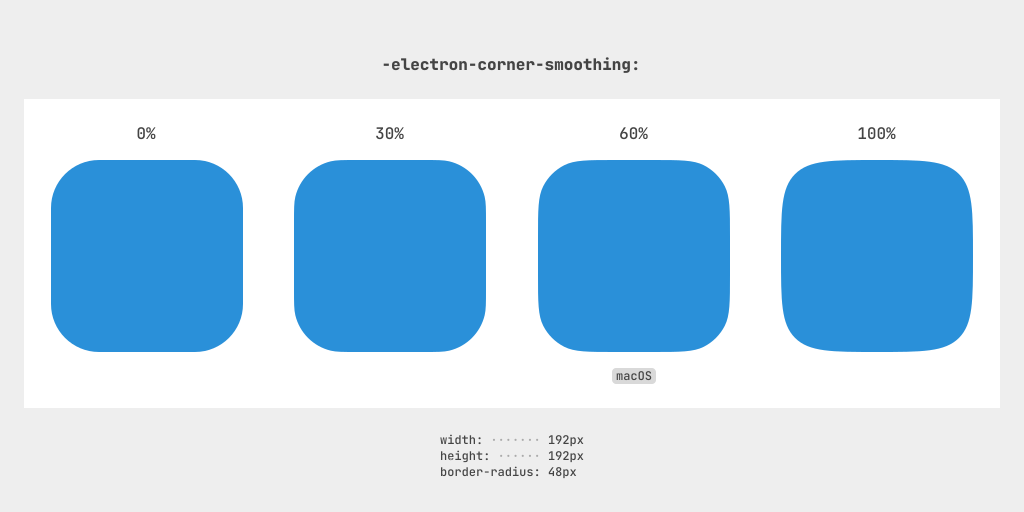
Electron 37 引入了自定义 -electron-corner-smoothing CSS 属性,这使应用能够创建更平滑的圆角,以匹配苹果 macOS 的设计风格。这个功能最初是在 Electron 36 中推出的,但我们觉得它值得获得更多关注。
🌐 Electron 37 introduces the custom -electron-corner-smoothing CSS property, which allows apps to create smoother rounded corners to match Apple's macOS design language. This feature originally landed in Electron 36, but we felt like it deserved a brighter spotlight.
| 代码 | 结果 |
|---|---|
|  |
与标准的 border-radius 属性不同,它会从矩形上切出四分之一圆角,-electron-corner-smoothing 会将曲线平滑地过渡为具有连续周长的 方形圆 形状。
🌐 Unlike the standard border-radius property, which carves quarter-circle corners out of a rectangle, -electron-corner-smoothing smoothly transitions
the curve into a squircle shape with a continuous perimeter.
你可以使用 0% 到 100% 的数值来调整平滑度,或者使用 system-ui 值以匹配操作系统的风格(macOS 上为 60%,其他系统为 0%)。
这一设计增强可以应用于边框、轮廓和阴影,为你的应用增添一层细腻的精致感。
🌐 You can adjust the smoothness using values from 0% to 100%, or use the system-ui value to match the operating system's style (60% on macOS and 0% otherwise).
This design enhancement can be applied on borders, outlines, and shadows, giving your app a subtle layer of polish.
阅读更多关于 Electron 中 squircles 实现的信息,请参见 @clavin 的 RFC 0012。 该文档更详细地介绍了动机和技术实现。
初始设计灵感来自 Figma 的圆角平滑实现。想了解他们为实现圆角平滑所做的探索,请阅读 《拼命寻找 squircles》。
技术栈变更
🌐 Stack Changes
- Chromium
138.0.7204.35 - 节点
22.16.0 - V8
13.8
Electron 37 将 Chromium 从 136.0.7103.48 升级到 138.0.7204.35,并将 V8 从 13.6 升级到 13.8。
🌐 Electron 37 upgrades Chromium from 136.0.7103.48 to 138.0.7204.35, and V8 from 13.6 to 13.8.
新功能和改进
🌐 New Features and Improvements
- 为
window.open添加了innerWidth和innerHeight选项。#47039(也在 35、36 中出现) - 在
webContents中添加了before-mouse-event,以允许拦截和阻止鼠标事件。#47364(也包含在 36 中) - 已向
ServiceWorkerMain添加scriptURL属性。 #45863 - 在 macOS >= 14.4 的菜单中添加了
sublabel功能。#47042(也包含在 35、36 中) - 已添加对
HIDDevice.collections的支持。#47483(也在 36 中) - 添加了对
--no-experimental-global-navigator标志的支持。 #47418(也在 35、36 中) - 在 Linux X11 上增加了对
screen.dipToScreenPoint(point)和screen.screenToDipPoint(point)的支持。#46895(也包含在 35、36 中) - 在 macOS 上添加了对菜单项角色
palette和header的支持。#47245 - 添加了对节点选项
--experimental-network-inspection的支持。 #47031(同样在 35、36 中) - 暴露
win.isContentProtected()以便开发者检查窗口保护状态。#47310(也在 36 中)
重大变化
🌐 Breaking Changes
实用程序处理未处理的拒绝行为变更
🌐 Utility Process unhandled rejection behavior change
当发生未处理的拒绝时,实用程序进程现在将显示错误消息警告,而不是使进程崩溃。
🌐 Utility Processes will now warn with an error message when an unhandled rejection occurs instead of crashing the process.
要恢复之前的行为,你可以使用:
🌐 To restore the previous behavior, you can use:
process.on('unhandledRejection', () => {
  process.exit(1);
});
行为改变:process.exit() 同步杀死实用程序进程
🌐 Behavior Changed: process.exit() kills utility process synchronously
在实用程序进程中调用 process.exit() 现在会同步终止该实用程序进程。这使得 process.exit() 的行为与 Node.js 的行为一致。
🌐 Calling process.exit() in a utility process will now kill the utility process synchronously.
This brings the behavior of process.exit() in line with Node.js behavior.
请参考Node.js 文档和PR #45690以了解其潜在影响,例如在调用 process.exit() 之前调用 console.log() 时的情况。
🌐 Please refer to the
Node.js docs and
PR #45690 to understand the potential
implications of that, e.g., when calling console.log() before process.exit().
行为变更:WebUSB 和 WebSerial 黑名单支持
🌐 Behavior Changed: WebUSB and WebSerial Blocklist Support
WebUSB 和 Web Serial 现在支持 Chromium 使用的 WebUSB 黑名单 和 Web Serial 黑名单,并在各自的规范中进行了说明。
要禁用这些功能,用户可以在命令行中传入 disable-usb-blocklist 和 disable-serial-blocklist 参数。
🌐 To disable these, users can pass disable-usb-blocklist and disable-serial-blocklist as command line flags.
已移除:ProtocolResponse 中 session 属性的 null 值
🌐 Removed: null value for session property in ProtocolResponse
此弃用功能已被移除。
🌐 This deprecated feature has been removed.
以前,将 ProtocolResponse.session 属性设置为 null 会创建一个随机独立会话。现在不再支持此功能。
🌐 Previously, setting the ProtocolResponse.session property to null
would create a random independent session. This is no longer supported.
由于开销原因,不建议在此使用单用途会话;然而,需要保持这一行为的旧代码可以通过创建一个带有 session.fromPartition(some_random_string) 的随机会话,然后在 ProtocolResponse.session 中使用它来模拟。
🌐 Using single-purpose sessions here is discouraged due to overhead costs;
however, old code that needs to preserve this behavior can emulate it by
creating a random session with session.fromPartition(some_random_string)
and then using it in ProtocolResponse.session.
行为已更改:Linux 上的 BrowserWindow.IsVisibleOnAllWorkspaces()
🌐 Behavior Changed: BrowserWindow.IsVisibleOnAllWorkspaces() on Linux
BrowserWindow.IsVisibleOnAllWorkspaces() 现在在 Linux 上如果窗口当前不可见将返回 false。
34.x.y 版本支持终止
🌐 End of Support for 34.x.y
根据项目的支持政策,Electron 34.x.y 已达到支持结束期。建议开发者和应用升级到更新版本的 Electron。
🌐 Electron 34.x.y has reached end-of-support as per the project's support policy. Developers and applications are encouraged to upgrade to a newer version of Electron.
| E37(25年6月) | E38(25年8月) | E39(25年10月) |
|---|---|---|
| 37.x.y | 38.x.y | 39.x.y |
| 36.x.y | 37.x.y | 38.x.y |
| 35.x.y | 36.x.y | 37.x.y |
下一步计划
🌐 What's Next
短期内,你可以预期团队将继续专注于跟上构成 Electron 的主要组件(包括 Chromium、Node 和 V8)的开发。
🌐 In the short term, you can expect the team to continue to focus on keeping up with the development of the major components that make up Electron, including Chromium, Node, and V8.
你可以在这里找到 Electron 的公开时间线。
🌐 You can find Electron's public timeline here.
有关未来更改的更多信息可以在计划中的重大变更页面上找到。
🌐 More information about future changes can be found on the Planned Breaking Changes page.